한국 여행의 필수품, 왜 파파고일까? (Introduction: Why Papago is Essential for Traveling in Korea)

한국을 방문하는 외국인 관광객이나 한국에 거주하는 외국인(Expat)들이 가장 먼저 겪는 장벽은 바로 ‘언어’입니다. 전 세계적으로는 ‘구글 번역기(Google Translate)’가 가장 보편적인 번역 도구로 사용되지만, 한국에 도착하는 순간 상황은 완전히 달라집니다.
The very first barrier foreign tourists or expats face when visiting South Korea is “language.” Globally, Google Translate is the undisputed go-to translation tool. However, the moment you step foot in Korea, the game changes entirely.
한국에서는 구글 번역기보다 네이버(Naver)에서 개발한 ‘파파고(Papago)’가 압도적인 정확성과 편의성을 자랑합니다. 단순히 단어를 바꾸는 수준을 넘어, 한국어 특유의 미묘한 뉘앙스, 존댓말, 그리고 최신 유행어까지 완벽하게 잡아내기 때문입니다.
In South Korea, Papago, developed by the Korean tech giant Naver, boasts overwhelming accuracy and convenience compared to Google Translate. It goes far beyond merely swapping words; it perfectly captures the subtle nuances, honorifics (polite language), and the latest slang unique to the Korean language.
이 글에서는 왜 외국인들이 한국에서 구글 대신 파파고를 써야 하는지 그 이유를 깊이 있게 분석하고, 특히 일상생활에서 가장 유용한 ‘이미지 번역(Image Translation)’ 기능의 완벽한 활용법과 실전 팁을 상세하게 소개하겠습니다.
In this comprehensive guide, we will deeply analyze why foreigners must use Papago instead of Google in Korea. Furthermore, we will provide a highly detailed, step-by-step tutorial and practical tips on how to master the “Image Translation” feature, which will undoubtedly become your best friend in your daily Korean life.
1. 파파고 vs 구글 번역기: 왜 한국어는 파파고가 훨씬 정확할까? (Papago vs Google: Why is Papago Much More Accurate for Korean?)
구글 번역기가 훌륭한 도구임은 틀림없지만, 한국어 번역에 있어서만큼은 파파고가 확실한 우위를 점하고 있습니다. 그 이유는 데이터의 질과 양, 그리고 한국어 고유의 문법적 특성을 이해하는 AI의 설계 방식에 있습니다.
While Google Translate is undeniably a fantastic tool, Papago holds a clear and definitive advantage when it comes to translating Korean. The reasons lie in the quality and quantity of training data, and the AI’s design that inherently understands the grammatical and cultural quirks of the Korean language.
① 네이버(Naver)의 방대한 한국어 데이터베이스 (The Power of Naver’s Database)
네이버는 한국에서 구글을 제치고 가장 많이 사용되는 검색 엔진입니다. 이는 곧 네이버가 한국인들이 매일 생산하는 뉴스, 블로그, 카페 글, 지식인 질문 등 엄청난 양의 ‘가장 자연스러운 최신 한국어 데이터’를 보유하고 있음을 의미합니다.
Naver is the undisputed number one search engine in South Korea, beating out Google in the domestic market. This means Naver possesses an astronomical amount of the most natural, up-to-date Korean text generated daily by Koreans—ranging from news articles and blogs to community forums and Q&A platforms.
파파고는 이 방대한 데이터를 바탕으로 인공신경망 기계번역(NMT)을 학습하기 때문에, 교과서적인 딱딱한 번역이 아닌 실제 한국인들이 쓰는 자연스러운 문장으로 번역해 냅니다. 반면 구글은 전 세계 언어를 다루다 보니 한국어의 미묘한 문맥이나 최신 트렌드를 반영하는 속도가 상대적으로 느립니다.
Papago’s Neural Machine Translation (NMT) is trained on this massive, localized dataset. As a result, it produces natural, everyday Korean sentences rather than stiff, textbook-style translations. Because Google handles over a hundred languages globally, its ability to reflect the subtle context and the latest trends of the Korean language is relatively slower.
② 가장 중요한 기능: ‘높임말(존댓말)’ 스위치 (The Most Crucial Feature: The Honorifics Toggle)
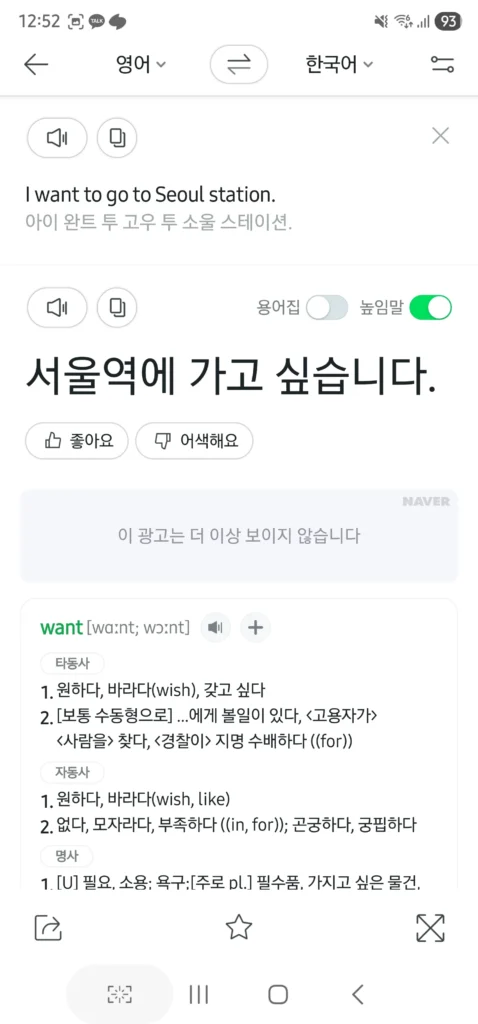
외국인들이 한국어를 배울 때 가장 어려워하는 부분이 바로 ‘존댓말(Honorifics)’과 ‘반말(Casual speech)’의 구분입니다. 식당 종업원이나 택시 기사님에게 영어로 “I want to go to Seoul Station”이라고 입력했을 때, 구글 번역기는 종종 “나는 서울역에 가고 싶다” (반말/문어체)로 번역하여 예의 없는 상황을 연출할 수 있습니다.
The single most difficult aspect for foreigners learning Korean is distinguishing between “Jondaetmal” (polite/formal language) and “Banmal” (casual/informal language). If you type “I want to go to Seoul Station” into Google Translate to show a taxi driver, it might translate it to “나는 서울역에 가고 싶다” (Naneun Seoul-yeok-e gago sipda)—which is highly informal, blunt, and sounds like you are talking to a close friend or reading a diary.
하지만 파파고는 번역 결과 창 하단에 ‘높임말(Honorifics)’ 스위치가 있습니다. 이 스위치를 켜면 “저는 서울역에 가고 싶어요” 또는 “서울역으로 가주세요”와 같이 상황에 맞는 완벽하고 예의 바른 존댓말로 변환됩니다. 이는 한국 문화를 이해하고 존중하고자 하는 외국인들에게 필수적이고 혁신적인 기능입니다.
Papago solves this beautifully. It features an “Honorifics” (높임말) toggle switch right below the translation result. Turn it on, and the sentence magically transforms into “저는 서울역에 가고 싶어요” (Jeoneun Seoul-yeok-e gago sipeoyo)—a perfectly polite and natural sentence appropriate for strangers, elders, or service staff. This is an absolutely essential feature for expats who want to respect Korean culture and avoid accidental rudeness.
③ 자연스러운 문맥 파악 및 신조어/줄임말 번역 (Understanding Context, Slang, and Abbreviations)
한국어는 주어가 자주 생략되고 문맥에 따라 단어의 뜻이 완전히 달라지는 고맥락(High-context) 언어입니다. 또한 ‘치맥(치킨과 맥주)’, ‘아아(아이스 아메리카노)’ 같은 줄임말이 일상적으로 쓰입니다. 구글은 이를 직역하여 이상한 결과를 내놓는 경우가 많지만, 파파고는 문맥을 파악하여 “Chimaek (Chicken and Beer)” 또는 “Iced Americano”로 정확하게 번역해 냅니다.
Korean is a “high-context” language where subjects are frequently omitted, and a word’s meaning can change entirely depending on the situation. Furthermore, Koreans love abbreviations. Everyday words like “Chimaek” (Chicken and Beer) or “Ah-Ah” (Iced Americano) are everywhere. Google Translate often attempts to translate these literally, resulting in nonsensical English. Papago, intimately familiar with Korean street culture, instantly recognizes these terms and translates them perfectly into “Chicken and Beer” or “Iced Americano,” making it incredibly reliable for daily survival.
2. 외국인의 구세주: 파파고 ‘이미지 번역’ 완벽 활용 가이드 (The Savior for Foreigners: The Ultimate Guide to Papago’s Image Translation)
한국 여행 중 식당에 들어갔는데 영어 메뉴판이 없거나, 마트에서 화장품을 샀는데 사용법이 온통 한국어로 적혀있어 당황한 적이 있나요? 에어비앤비(Airbnb)에 머물며 세탁기나 보일러의 복잡한 버튼들을 눌러야 할 때도 마찬가지입니다. 이때 파파고의 ‘이미지 번역(Image Translation)’ 기능은 말 그대로 구세주가 됩니다. 파파고의 광학 문자 인식(OCR) 기술은 복잡한 배경이나 다양한 폰트의 한국어 글씨를 빠르고 정확하게 읽어냅니다.
Have you ever walked into a local Korean restaurant only to find there is no English menu? Or bought a highly recommended K-beauty cosmetic product at Olive Young, but the instructions are entirely in Korean? How about staying at a local Airbnb and staring blankly at the extremely complicated buttons on a Korean washing machine or the floor heating (Ondol) thermostat? In these highly common scenarios, Papago’s “Image Translation” feature is a literal lifesaver. Papago’s Optical Character Recognition (OCR) technology is remarkably adept at reading Korean text accurately, even against complex backgrounds or in fancy, handwritten-style fonts.
💡 이미지 번역 실전 활용법 3가지 (3 Practical Ways to Use Image Translation)
방법 1: 실시간 번역 (Real-time Translation – AR Mode)
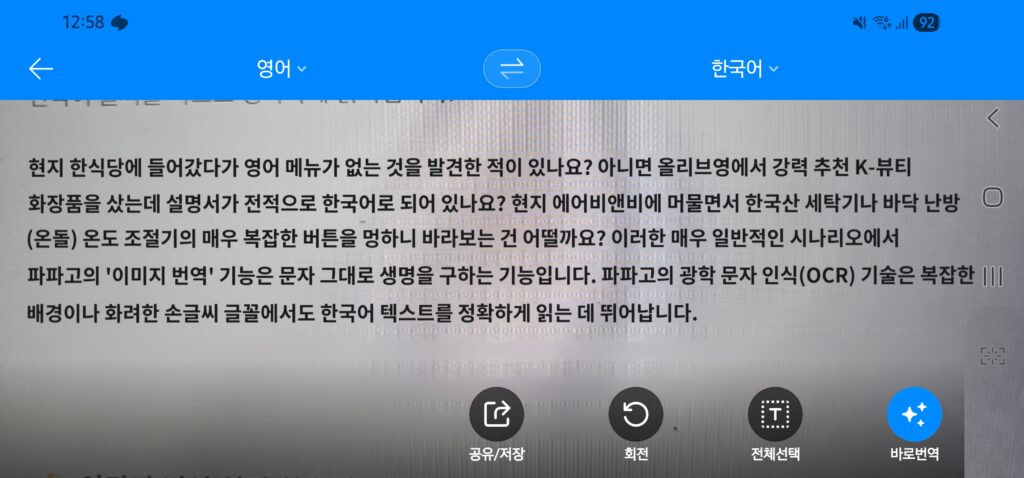
가장 빠르고 간편한 방법입니다. 카메라를 켜고 번역하고 싶은 대상에 가져다 대기만 하면, 화면 속 한국어가 마법처럼 영어(또는 설정한 언어)로 바뀌어 보입니다.
언제 유용할까요? 길거리의 표지판을 읽을 때, 지하철역의 안내문을 빠르게 확인할 때, 식당 밖 유리에 붙어있는 메뉴를 스캔할 때 매우 유용합니다.
사용 방법:
- 파파고 앱을 엽니다.
- 화면 중앙에 있는 ‘이미지(Image)’ 아이콘을 탭합니다.
- 상단에 ‘실시간 번역(Real-time)’ 아이콘이 켜져 있는지 확인합니다.
- 카메라 렌즈를 텍스트에 맞추면 화면 위에서 글씨가 즉시 변환됩니다. (팁: 손을 떨지 않고 유지하는 것이 중요합니다!)
This is the fastest and most convenient method. You simply point your camera at the text you want to translate, and the Korean words on your screen will magically morph into English (or your target language) in real-time.
When is it useful? This is incredibly handy for quickly reading street signs, glancing at subway notices, or scanning menus pasted on restaurant windows as you walk by.
How to use:
- Open the Papago app.
- Tap the ‘Image’ (camera) icon located in the center of the main screen.
- Ensure the ‘Real-time’ toggle at the top is turned on.
- Hover your camera over the text. The translation will overlay the original text instantly. (Pro-tip: Hold your hand as steady as possible for the best results!)
방법 2: 사진 촬영 후 전체 번역 (Snap & Translate – High Accuracy)
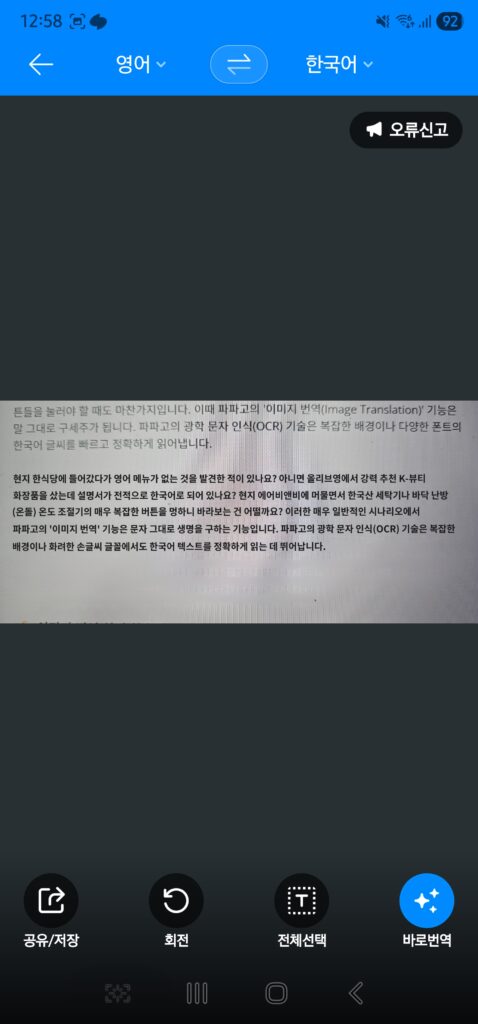
실시간 번역은 화면이 흔들리면 글씨가 깨질 수 있습니다. 긴 글이나 세밀한 번역이 필요할 때는 직접 사진을 찍어서 번역하는 것이 훨씬 정확합니다.
언제 유용할까요? 식당 자리에 앉아 메뉴판 전체를 정독할 때, 마트에서 구입한 식료품의 영양성분표나 알레르기 유발 물질을 확인할 때, 화장품의 사용 설명서를 읽을 때 필수적입니다.
사용 방법:
- 이미지 번역 화면에서 하단의 동그란 촬영 버튼(Shutter button)을 누릅니다.
- 파파고가 사진 속 텍스트를 스캔합니다.
- 사진 속의 모든 한국어가 지정된 언어로 깔끔하게 덮어씌워져 번역됩니다. 원본 사진과 이질감 없이 텍스트만 바뀌어 가독성이 매우 뛰어납니다.
Real-time translation can sometimes be glitchy if your hand shakes or if the text is dense. For longer texts or when you need absolute precision, taking a photo is vastly superior and highly recommended.
When is it useful? This is essential when you are sitting at a table and want to thoroughly read a complex restaurant menu. It’s also crucial for checking nutritional facts, allergy warnings on groceries, or reading detailed instructions on K-beauty products.
How to use:
- In the Image Translation screen, tap the circular shutter button at the bottom to take a picture.
- Papago will quickly scan the image.
- All the recognized Korean text will be seamlessly replaced with translated text. Papago matches the background color, making it look like the menu was originally printed in English. It’s highly readable and accurate.
방법 3: 부분 번역 (Highlight/Rub to Translate – The Secret Pro Tip)
많은 외국인들이 잘 모르는 파파고만의 숨겨진 ‘꿀팁’입니다. 전체 번역이 필요 없고 사진 속 특정 단어 한두 개만 알고 싶을 때 사용합니다.
언제 유용할까요? 에어비앤비 보일러 컨트롤러에서 딱 하나의 버튼(예: ‘외출’ 또는 ‘전원’)의 의미만 알고 싶을 때, 영수증에서 특정 항목이 무엇인지 확인할 때 유용합니다.
사용 방법:
- 사진을 촬영한 후, 화면 아래쪽 도구 모음에서 ‘부분 번역(Partial Translation)’ 아이콘을 선택합니다.
- 손가락을 사용해 번역하고 싶은 텍스트 부분만 형광펜을 칠하듯 문지릅니다(Rub).
- 선택한 영역의 텍스트만 깔끔하게 인식되어 상단에 번역 결과가 나타납니다.
This is a hidden gem that many expats and tourists don’t know about. You use this when you don’t need the whole page translated, but rather just one or two specific words.
When is it useful? Imagine you are staring at your Airbnb’s floor heating (Ondol) thermostat. You don’t need to translate the entire wall; you just need to know which specific button means “Power” (전원) or “Going out” (외출). It’s also great for deciphering specific line items on a receipt.
How to use:
- After taking a picture with the shutter button, look at the bottom toolbar and select the ‘Partial Translation’ (or highlight) icon.
- Use your finger to rub or highlight exactly over the specific Korean word you want to translate.
- Papago will isolate that specific area and display the highly accurate translation at the top of your screen.
3. 외국인이 꼭 알아야 할 파파고의 추가 생존 팁 (Must-Know Extra Survival Tips for Foreigners)
이미지 번역 외에도 파파고에는 한국 생활의 질을 수직 상승시켜 줄 유용한 기능들이 많습니다.
- 음성 대화 모드 (Conversation Mode): 길을 잃었을 때나 택시 기사님과 소통해야 할 때 필수적입니다. 마이크를 누르고 영어로 말하면 한국어로 즉시 음성 출력되며, 상대방이 한국어로 말하면 다시 영어로 번역해 줍니다. 매우 직관적인 인터페이스로 양방향 소통이 가능합니다.
- 오프라인 번역 (Offline Translation): 한국에 도착하자마자 공항에서 유심(SIM) 카드를 구매하기 전, 인터넷이 안 터지는 상황을 대비하세요. 출발 전 자국에서 미리 파파고 앱을 다운로드하고 ‘한국어-영어 오프라인 언어팩’을 다운로드해 두면, Wi-Fi나 데이터 없이도 기본적인 텍스트 번역을 할 수 있습니다.
- 웹사이트 번역 (Website Translation): 한국의 쇼핑몰(쿠팡, 무신사)이나 예약 사이트(네이버 예약, KTX 기차표 예매)를 이용할 때, URL을 파파고 웹사이트 번역기에 붙여넣으면 페이지 전체를 영어로 완벽하게 번역해 주어 한국인처럼 쉽게 온라인 쇼핑과 예약을 할 수 있습니다.
Beyond image translation, Papago is packed with features that will dramatically elevate your quality of life in Korea.
- Conversation Mode: This is absolutely vital when you are lost or need to communicate directly with a taxi driver, market vendor, or pharmacist. Tap the microphone, speak in English, and Papago will speak the Korean translation out loud. When the other person replies in Korean, it translates it back to English. The split-screen interface makes two-way communication incredibly smooth.
- Offline Translation: Be prepared for that crucial window of time when you land at Incheon Airport but haven’t purchased a local SIM card or connected to Wi-Fi yet. Before leaving your home country, download the Papago app and download the “Korean-English Offline Language Pack” in the settings. This allows you to perform basic text translations entirely without data or Wi-Fi.
- Website Translation: Navigating Korean domestic websites can be a nightmare due to language barriers and unique layouts. If you want to order from Coupang (Korea’s Amazon), buy clothes on Musinsa, or book a KTX bullet train ticket, simply copy the website URL and paste it into Papago’s website translation feature. It translates the entire page layout seamlessly, allowing you to shop and book online just like a local.
4. 구글 번역기는 아예 쓸모가 없을까? (Is Google Translate Completely Useless in Korea?)
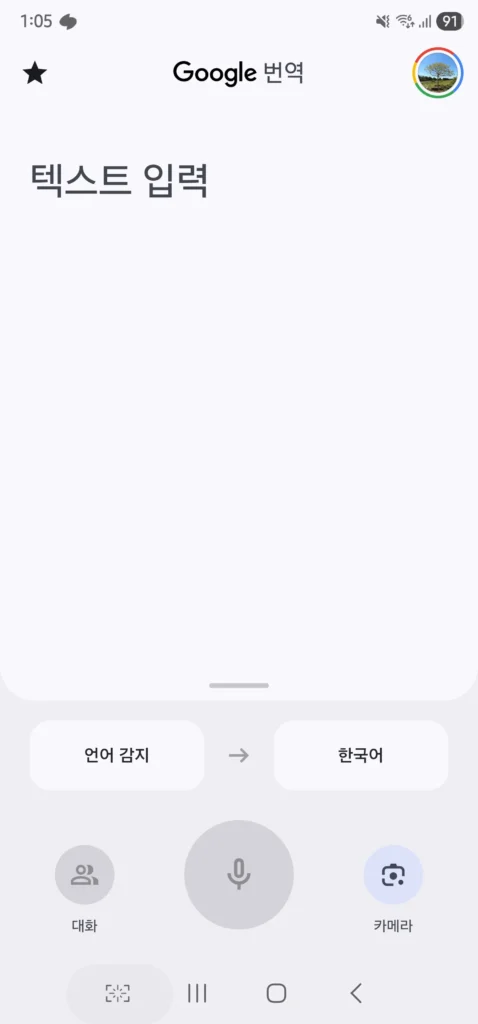
그렇다면 한국에서는 구글 번역기를 지워버려도 될까요? 결론부터 말하자면 ‘아닙니다’. 파파고는 한국어-영어, 한국어-일본어, 한국어-중국어 번역에서는 세계 최고 수준이지만, 지원하는 언어의 수에 있어서는 구글이 여전히 압도적입니다.
So, should you just delete Google Translate from your phone when you land in Seoul? The short answer is: No. While Papago is undeniably the world champion for Korean-to-English, Korean-to-Japanese, and Korean-to-Chinese translation, Google still reigns supreme when it comes to the sheer volume of languages supported.
만약 당신의 모국어가 영어나 주요 아시아 언어가 아닌 프랑스어, 스페인어, 아랍어 등이라면, 한국어를 해당 언어로 직역할 때는 구글 번역기가 더 유리할 수 있습니다. 또한 안드로이드 스마트폰에 기본적으로 통합된 기능이나 구글 렌즈(Google Lens)와의 연동성 측면에서는 구글 번역기가 편리한 부분도 있습니다.
If your native language is not English or a major Asian language—for example, if you speak French, Spanish, Arabic, or German—Google Translate might sometimes offer broader support or better direct translation to your native tongue without using English as an intermediary bridge. Additionally, Google Translate’s deep integration into the Android ecosystem and Google Lens still offers everyday utility.
따라서 “한국어 ↔ 영어” 번역은 무조건 파파고를 메인으로 사용하되, 다양한 다국어 환경이 필요할 때는 구글 번역기를 보조 도구로 함께 사용하는 것이 가장 현명한 전략입니다.
Therefore, the smartest survival strategy in Korea is this: Make Naver Papago your absolute main tool for any Korean ↔ English interactions, but keep Google Translate tucked away in a folder as a backup tool for broader multilingual needs.
5. 한국 여행을 앞두고 있다면 지금 당장 파파고를 설치하세요 (Conclusion: Download Papago Right Now)
언어 장벽은 여행의 즐거움을 반감시키고, 타국에서의 생활을 피곤하게 만드는 가장 큰 요인입니다. 하지만 한국에서는 ‘네이버 파파고’라는 강력한 무기 하나면 대부분의 문제를 해결할 수 있습니다. 존댓말을 정확히 구사하여 한국인들에게 예의 바른 인상을 남길 수 있고, 복잡한 한글 메뉴판과 영양성분표도 카메라 렌즈 하나로 완벽하게 해독할 수 있습니다.
The language barrier is the biggest factor that can dampen the joy of traveling or add exhaustion to living as an expat in a foreign country. However, in South Korea, armed with the powerful tool known as Naver Papago, you can solve 99% of your communication struggles. You can leave a polite and wonderful impression on locals by using perfectly translated honorifics, and you can decipher the most complex Korean menus, street signs, and cosmetic labels with just the lens of your camera.
한국으로의 여행, 유학, 혹은 비즈니스 출장을 계획하고 계신가요? 비행기에 탑승하기 전, 스마트폰에 가장 먼저 설치해야 할 단 하나의 앱을 꼽으라면 주저 없이 파파고를 추천합니다. 여러분의 한국 생활이 훨씬 더 풍요롭고 편리해질 것입니다!
Are you planning a trip, a study abroad semester, or a business trip to South Korea? If we had to recommend only one single app you absolutely must install on your smartphone before boarding your flight, it is without hesitation Naver Papago. It will dramatically reduce your stress and make your Korean experience infinitely richer, more delicious, and incredibly convenient! Safe travels!