“I opened Google Maps in Seoul, but it doesn’t show walking directions!”
(서울에서 구글맵을 켰는데 도보 길 찾기가 안 돼요!)
한국 여행을 온 외국인 친구들이 가장 먼저 하는 당황스러운 경험입니다.
결론부터 말씀드리면, 한국에서는 구글맵(Google Maps)을 믿으시면 안 됩니다. 안보상의 이유로 지도 데이터 반출이 제한되어 있어, 길 찾기 기능이 제대로 작동하지 않기 때문입니다.
Google Maps does NOT work properly in Korea. Due to security laws, navigation data is restricted, so it cannot provide walking or driving directions.
하지만 걱정하지 마세요. 한국에는 구글맵보다 훨씬 강력하고 정확한 네이버 지도(Naver Map)가 있습니다. K-드라마 촬영지를 찾아가기 위한 첫걸음! 네이버 지도 영어 설정법과 완벽 사용법을 가이드 해드립니다.
But don’t worry. Korea has Naver Map, which is much more powerful and accurate than Google Maps. Here is a complete guide on how to set up and use Naver Map in English.
Step 1. 다운로드 및 영어 설정 (Download & Language Settings)
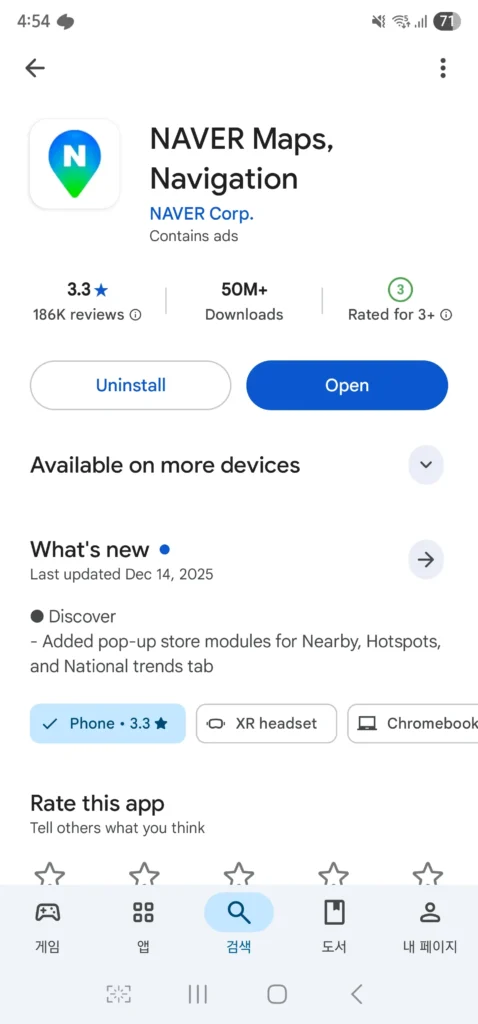
가장 먼저 앱을 다운로드해야겠죠? 앱스토어에서 ‘Naver Map’을 검색하세요.
First, search for ‘Naver Map’ in the App Store or Google Play.
- iOS NAVER Maps (App Store)
- Android NAVER Maps (Google Play)
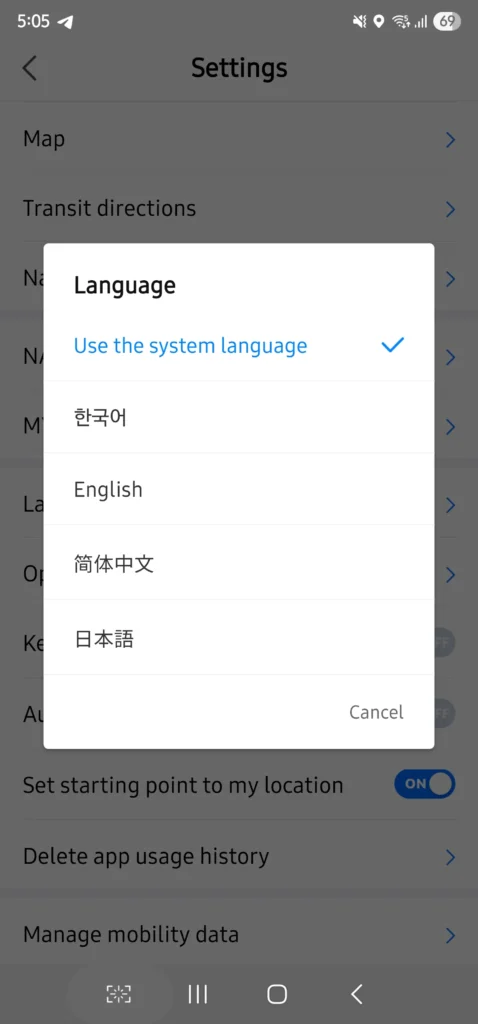
언어 변경하기 (How to change language to English)
앱을 처음 설치하면 한국어로 나올 수 있습니다. 당황하지 말고 아래 순서대로 따라 하세요.
If the app appears in Korean upon installation, follow these steps to change it to English.
- 상단 검색창에 오른쪽 끝에 있는 프로필을 누르세요.
Click on the profile icon at the far right of the top search bar. - 상단 톱니바퀴 모양의 설정 (Settings / 설정) 아이콘을 누르세요.
Click the gear-shaped Settings icon at the top. - [언어 (Language)] 메뉴를 클릭하세요.
Tap the [Language] menu. - [English]를 선택하면 앱이 재시작되며 영어로 바뀝니다.
Select [English]. The app will restart in English.
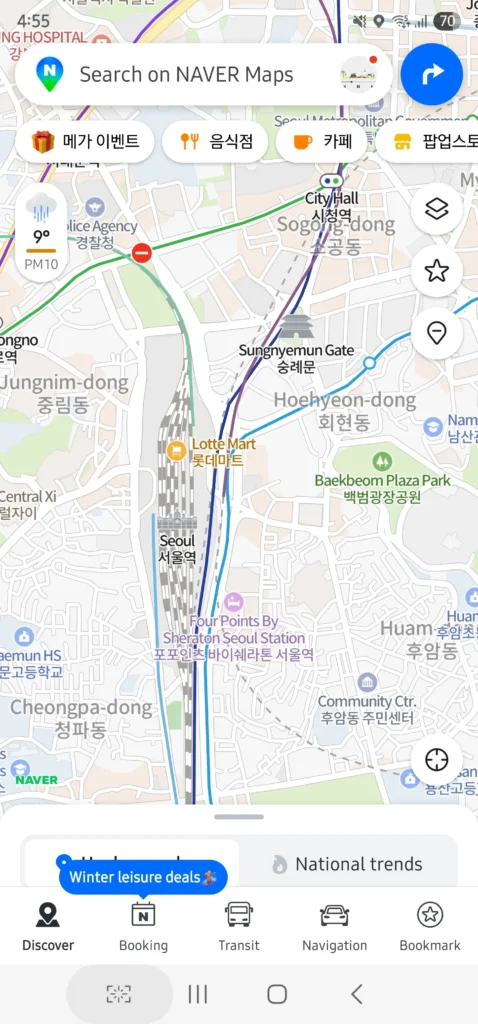
Step 2. 똑똑하게 검색하기 (How to Search)
영어 설정이 끝났다면 이제 목적지를 검색해 볼까요?
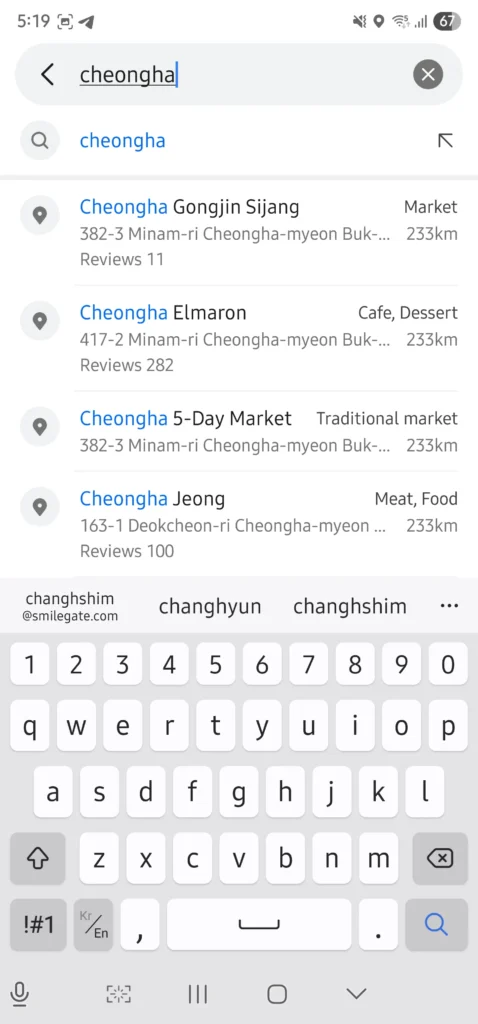
네이버 지도는 영어 검색을 지원하지만, 한국어 주소를 넣었을 때 가장 정확합니다.
Now, let’s search for a destination. Naver Map supports English search, but copying and pasting the Korean address is the most accurate method.
Tip 1. 이 블로그의 주소를 ‘복사+붙여넣기’ 하세요.
Travel to Drama의 모든 글에는 장소의 한국어 주소(Korean Address)가 함께 적혀 있습니다. 영어로 검색해서 안 나올 때는 한국어 주소를 그대로 복사해서 붙여넣으세요.
Copy and paste the Korean address provided in our blog posts. Some places can be searched even if you type them in English.
- Example: “Cheongha Gongjin Market” (O), “청하공진시장” (O)
Tip 2. 전화번호 검색 (Phone Number Search)
한국어 주소를 모르겠다면? 가게의 전화번호를 검색창에 입력해보세요. 놀랍게도 바로 해당 장소가 뜹니다. 맛집이나 숙소를 찾을 때 유용한 꿀팁입니다.
If you don’t know the address, try entering the phone number of the restaurant or shop. It works like magic!
Step 3. 길 찾기 (Navigation: Bus & Subway)
원하는 장소를 찾았다면, 하단의 파란색 [길 찾기(Directions)] 버튼을 누르세요.
Once you find the place, tap the blue [Directions] button at the bottom.
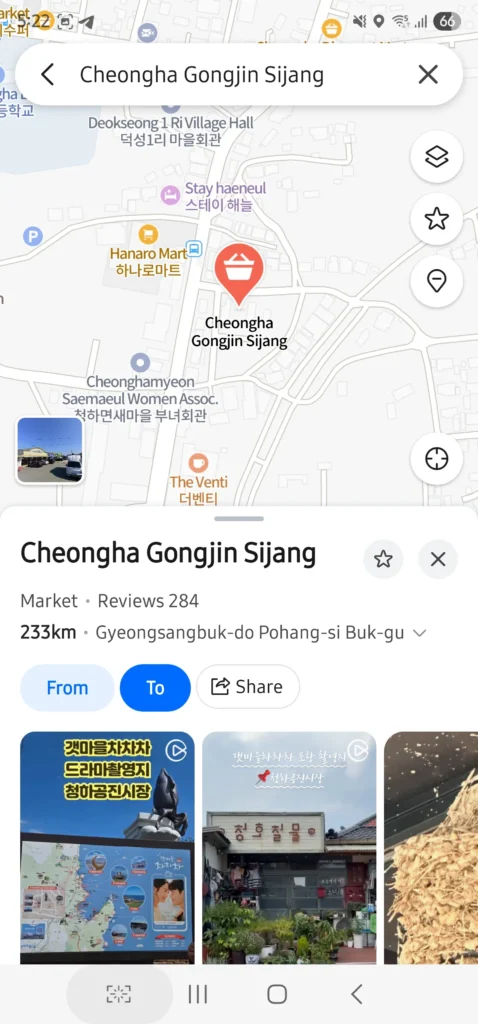
① 출발지와 목적지 확인 (From & To)
- From: Current Location (현재 위치)
- To: Your Destination (목적지)
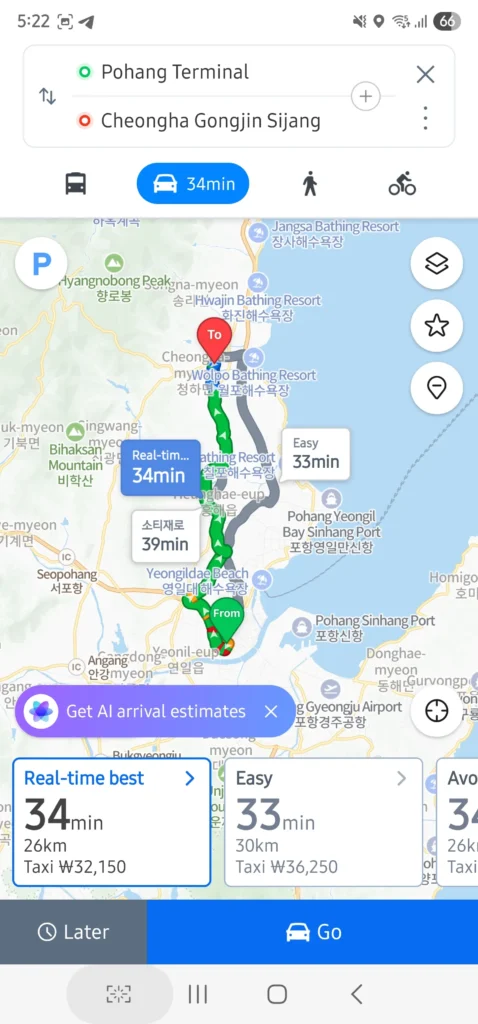
② 이동 수단 선택 (Choose Transportation)
상단 아이콘을 통해 이동 방법을 선택할 수 있습니다.
Select your mode of transport using the icons at the top.
- Public Transport (대중교통): 버스와 지하철 경로를 보여줍니다. (Recommended!)
- Car (자동차): 택시 예상 요금(KRW)을 확인할 수 있습니다.
- Walk (도보): 가까운 거리는 걸어가는 경로를 점선으로 보여줍니다.
대중교통 이용 꿀팁 (Pro Tip)
경로를 클릭하면 “실시간 도착 정보(Real-time arrival)”가 뜹니다. 한국의 대중교통 시간은 매우 정확하니 이 시간을 믿고 움직이세요!
If you click on a route, you can see real-time arrival information (e.g., “Bus No. 203 will arrive in 5 mins”). Public transport in Korea is very punctual, so you can trust this time.
Step 4. 나만의 여행 지도 만들기 (Favorites / Bookmarks)
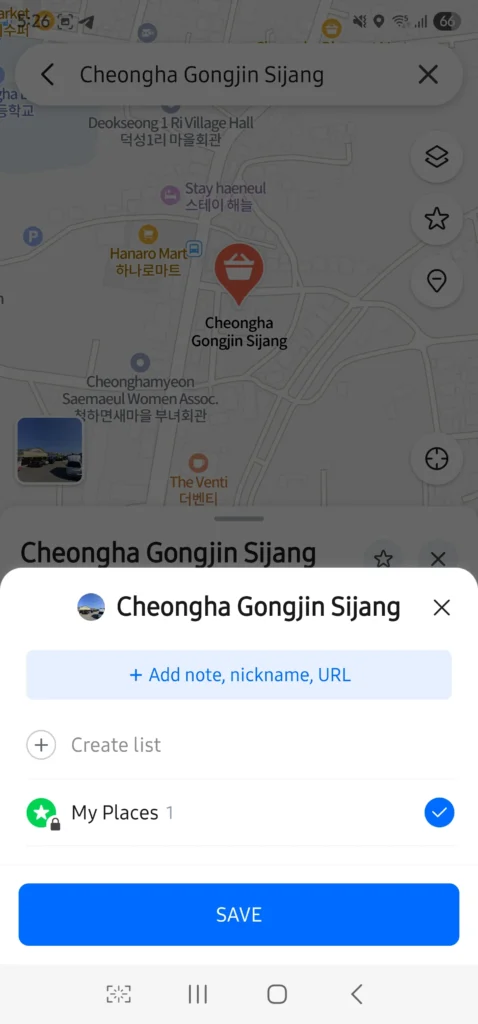
드라마 촬영지, 맛집, 숙소를 매번 검색하기 귀찮으신가요? 구글맵처럼 장소를 저장(Save) 할 수 있습니다.
Tired of searching for the same place? You can Save locations just like in Google Maps.
- 장소를 클릭하고 화면 하단의 [저장(Save)] 별표 아이콘을 누르세요.
Tap the [Save] (star icon) at the bottom of the location info. - [새 리스트(New List)]를 만들어 분류하세요. Create a [New List] to organize your spots.
- Ex: Kdrama Tour, Seoul Food, My Hotel
- 지도에 내가 저장한 장소들이 별(★)로 표시되어 동선을 짜기 편합니다.
Saved places will appear as stars (★) on the map, making it easy to plan your route.
자주 묻는 질문 (FAQ)
Q. 네이버 지도는 오프라인에서도 되나요?
Does Naver Map work offline?
A. 아니요, 네이버 지도를 사용하려면 인터넷 연결(WiFi 또는 Data)이 필수입니다. 한국 도착 전 eSIM이나 포켓 와이파이를 꼭 준비하세요.
No, an internet connection (WiFi or Data) is required. Please make sure to prepare an eSIM or Pocket WiFi before arriving in Korea.
Q. 카카오맵(Kakao Map)은 어떤가요?
What about Kakao Map?
A. 카카오맵도 훌륭하지만, 외국인 여행객에게는 네이버 지도의 영어 인터페이스가 조금 더 직관적이고 업데이트가 빠릅니다.
Kakao Map is also great, but Naver Map’s English interface is generally considered more user-friendly and up-to-date for foreign travelers.
Q. 택시를 부르고 싶어요.
I want to call a taxi.
A. 네이버 지도에서는 ‘택시 예상 요금’만 확인할 수 있습니다. 실제 택시 호출은 ‘Kakao T’ 앱을 사용해야 합니다.
Naver Map only shows the ‘estimated taxi fare’. To actually call a taxi, you need to use the ‘Kakao T’ app.
한국 여행에서 네이버 지도는 선택이 아닌 필수입니다. 처음에는 조금 낯설 수 있지만, 이 가이드만 따라 하면 서울의 복잡한 골목길도, 지방의 숨은 드라마 촬영지도 문제없이 찾아갈 수 있습니다.
Naver Map is not an option, but a necessity for traveling in Korea. Follow this guide, and you’ll be able to find any hidden K-drama filming spot without getting lost.
이제 지도를 설치했다면, 본격적으로 드라마 속 장소로 떠나볼까요?
Ready to explore? Let’s go find those drama spots!
👉 [[Filming Locations] 갯마을 차차차 촬영지 포항 여행 지도 보러 가기]
👉 [[Filming Locations] 눈물의 여왕 서울 촬영지 투어 정보 & 지도]
👉 [[Filming Locations] 눈물의 여왕 독일 촬영지: 베를릴, 포츠담, 프랑크푸르트 투어 정보 & 지도]
👉 [[Filming Locations] 눈물의 여왕 문경 촬영지: 용두리, 구랑리역, 에코월드 투어 정보 & 지도]